Intensity how much light
The master "how much is happening" dial. Low = sparse and moody, high = dense and bright.
Reach for it first when a look feels weak or overwhelming.
The panel is a mixing desk for light. This page explains every control on it — what it does, and when you'd actually reach for it. Use the filter to jump straight to a name you've seen in the app.
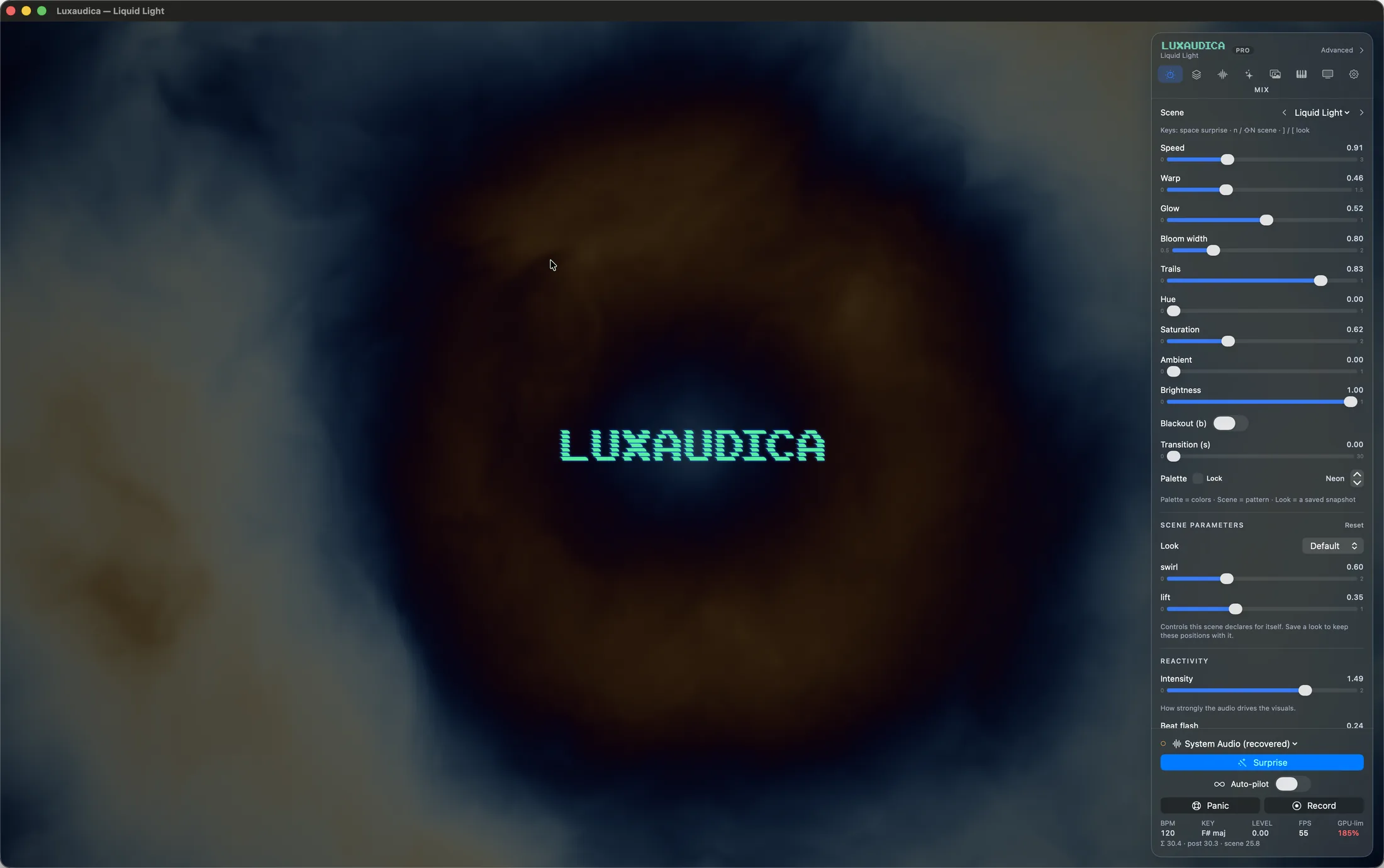
The panel is one job per tab. The groups further down this page are organised by what you're trying to do; this is where each thing physically is.
The things you set once and forget are not a tab any more — they are a window, on Settings… (⌘,), and it stays open beside the panel while you work. Six panes:
These sliders are the heart of the app. They are all safe to drag live — nothing can crash or go black.
The master "how much is happening" dial. Low = sparse and moody, high = dense and bright.
Reach for it first when a look feels weak or overwhelming.
Scales the motion of the whole scene without touching the beat lock. Slow it for ambient dinners, push it for peak time.
Bends and distorts the geometry. A little adds organic life; a lot melts the picture into abstraction.
The halo around bright things. This is the "expensive light" feel — neon signs, lasers through haze.
Pairs with Bloom width: amount says how strong, width says how far it spreads.
How long moving light lingers, like a slow-shutter photograph. High trails turn dancers of light into ribbons.
Trails are frame-rate-compensated: the smear looks identical whether your Mac renders 30, 60 or 120 frames a second.
One lever for how hard everything follows the song. At 0, the app responds gracefully (the old behavior, untouched). Turned up, soft pulses recede and strikes HIT — the quiet-to-drop swing gets visibly wider in every scene at once.
Try 0.5 for a club feel, 0.8+ when you want the drop to feel physical.
Lifts the darkest parts of the picture with a soft wash. Useful in bright rooms where true black looks like the app is off.
The output dimmer — the same job as a lighting fader. 0 is black (see Blackout for the show-safe way to do that).
Every scene is generative — the seed picks which variation of it you get. Nudge it for a sibling of the current picture; Surprise Me changes it for you.
Six curated palettes. The scene decides how color is used; the palette decides which family it draws from.
With Key color on, the palette follows the song instead — see Reactivity.
How long scene and preset changes take: 0 is a hard cut, up to 10 seconds for slow dissolves. Snappy for energetic sets, long for ambient.
The sliders above are the app's. These are the scene's own, and they change when the scene does. All 103 scenes have them; they live in the Mix tab, under the palette.
Every scene declares its own controls, in its own language: Chladni has plateM and plateN (the two mode numbers that ARE the figure), Faraday has ripples and damp, Skyline has towerCount. They appear as labelled sliders the moment you switch to the scene, and disappear when you leave it.
A count with no meaningful in-between — how many towers, how many folds — gets a stepper instead of a slider, so it can never land on a value the scene can't use.
Save a look and these positions travel with it, exactly like the global sliders do.
Each scene also ships at least two named value-sets over its own knobs — Faraday's Pond and Boiling, Ferrofluid's Quiescent and Rosensweig. Pick one from the Look row at the top of the group.
A recalled look glides over your crossfade time rather than snapping, so it reads as the scene changing its mind, not cutting. "Default" puts you back on the values the scene declares.
Returns every parameter of the current scene to the value the scene itself calls default. It leaves the global sliders alone, and it leaves every other scene's knobs alone.
The app always hears the music. These modes decide what it does with what it hears.
Lets the song's big shape steer the picture: build-ups swell the intensity, drops hit with impact, breakdowns pull back.
The live meters underneath show exactly what the app is hearing — energy, build, drop.
Reads the musical key of what's playing and derives the color grade from it. Songs in different keys literally look different.
Bright, airy sounds (hi-hats, strings) boost the glow; dark bass-heavy passages let it settle. Adds a subtle "the light is the sound" feel.
How strongly each beat pulses the frame. Default is half; turn it down if the throb bothers you, up for strobe-adjacent energy.
Caps every flash and strobe to a gentle pulse, app-wide. For guests with photosensitivity — or just a calmer wall. Overrides everything else, always wins.
If your room's sound reaches ears later than the video reaches eyes (big PA, projector delay), trim up to ±200 ms so the flash lands ON the kick.
A film-style grading chain sits after every scene. Identity by default; every control here is optional taste.
The same five dials a colorist uses. Exposure brightens the whole frame in camera-style stops; contrast spreads shadows from highlights; lift raises blacks; gamma bends the mids; gain scales the whites.
Rotate every color around the wheel, or drain/boost how vivid the frame is. These persist across Surprise and auto-pilot — they're YOUR signature, not the look's.
Color lookup files — the same format color graders trade. Ships with Noir, Teal Orange and Warm Film; drop any .cube file into the app's folder and it appears here. The amount slider blends it in.
Five subtle lens artifacts, all 0 by default: chromatic aberration (color fringing at the corners), grain, halation (red-ish bloom veil around hot lights), lens dirt, and a natural vignette.
Stretches highlights into horizontal lens streaks — the JJ Abrams look. Needs the modern bloom engine toggled on.
A curated lo-fi veneer over everything: scanlines and curvature (CRT), tape wobble (VHS), or projector flicker (Film), with one intensity dial. Baked into recordings.
What is on screen, and who decides.
Every visual world the app can paint, from fluid ink to chrome swarms. The keyboard steps through them: n forward, shift-n back.
See Scenes & looks for the guided tour of the library.
A new look in one press: fresh scene, fresh variation, parameters drawn from hand-tuned "moods" that match the music's current energy. It avoids repeating recent scenes and cannot pick something broken or ugly.
The app runs itself: changing looks on a timer or locked to the beat (for example, every 32 beats). You choose the pool it draws from — the whole gallery or just your favorites — and how often it invents something new versus recalling a saved look.
A preset (a "look") is the whole state of the panel: scene + every slider. 193 factory looks ship in the gallery.
Save the current look under any name; click to recall it (with your crossfade time). Rename, reorder and delete from the gallery.
Keys 1–0 recall the first ten looks in the gallery instantly — arrange your set's looks in those slots before a gig, then play them like pads.
The built-in gallery spans peak-time club energy to ambient nocturnes, each hand-tuned on its scene. New packs arrive with updates without disturbing anything you've saved, renamed or deleted.
Put a name on the wall without leaving the app.
Drop in a PNG and place it anywhere with position, scale and opacity controls — plus an optional gentle pulse on the beat.
One line of text over the visuals — artist name, song title, "last orders". Set it from the panel or remotely (MIDI, OSC, or the AI).
Where the picture goes and how hard the Mac works for it.
Fullscreen on any connected display; the panel stays put on another. Multiple outputs run simultaneously.
Matches render load to the machine and the room. Club renders lighter for fanless Macs; Tour (default) is full quality; Festival adds resolution and shadow detail for LED walls on powerful Macs.
The app negotiates the deepest color your display supports — 10-bit wide-gamut on modern Macs — with anti-banding dither. Gradients stay silk, not staircases. Automatic; you never touch it.
Cap the frame rate to save battery, heat and fan noise (installations, long ambient nights). Auto uses the display's full refresh.
Record the output to a movie file, or grab a full-quality still. What you see — including overlays and retro veneer — is what you get.
Live frames-per-second and per-frame cost in the panel. If the app ever has to throttle, this is where it tells you, before the audience notices.
Both are instant, both are reversible, both work from MIDI/OSC/AI too.
Instant black, remembering everything. Restore brings the exact same picture back at the exact same brightness. For set breaks and "the speeches are starting".
Returns to a guaranteed-visible, manual state: blackout cleared, full brightness, auto-pilot and show playback stopped. The look itself is untouched. When something feels wrong and you have three seconds, press this.
Want to practice? The Learn page has an interactive key trainer.