Reduce flashing
A photosensitivity cap tames the per-beat strobe so the room stays comfortable.
// The engine
The page for whoever has to sign this off before it goes near a rack. Every panel below is hands-on — change the source, flip an output filter, re-skin the desk. If you want the shorter answer, what it does for a room is one page back.
// Input
Luxaudica taps whatever's already playing on your Mac — pick a source, the show follows. No re-routing gymnastics.
Listening System audio — Whatever your Mac is playing — music apps, video, anything routed to your speakers.
In the app the picker is three buttons — System Audio, Microphone, Synthetic — with an input-device menu beside them. System Audio is a Core Audio process tap over the whole output mix, which is why a browser tab and a DJ app arrive with no routing software in between.
// Analysis
Every frame, Luxaudica measures what's playing — the beat and tempo, the musical key, and a full spectrum — and the visuals move with all of it. It happens entirely on your Mac.
// Beat
Phase-locked beat tracker · 60–200 BPM
// 8 bands
Log-spaced energy bands · bass · mid · treble
// Key
Krumhansl–Schmuckler · chroma → hue
FFT 2048 · hop 512 · 48 kHz · phase-locked beat · Krumhansl–Schmuckler key · chroma→hue — analyzed on-device.
// The desk
Every control in one window — intensity, speed, warp, glow, trails, palettes and per-beat reactivity. Set the look; the music drives the rest.
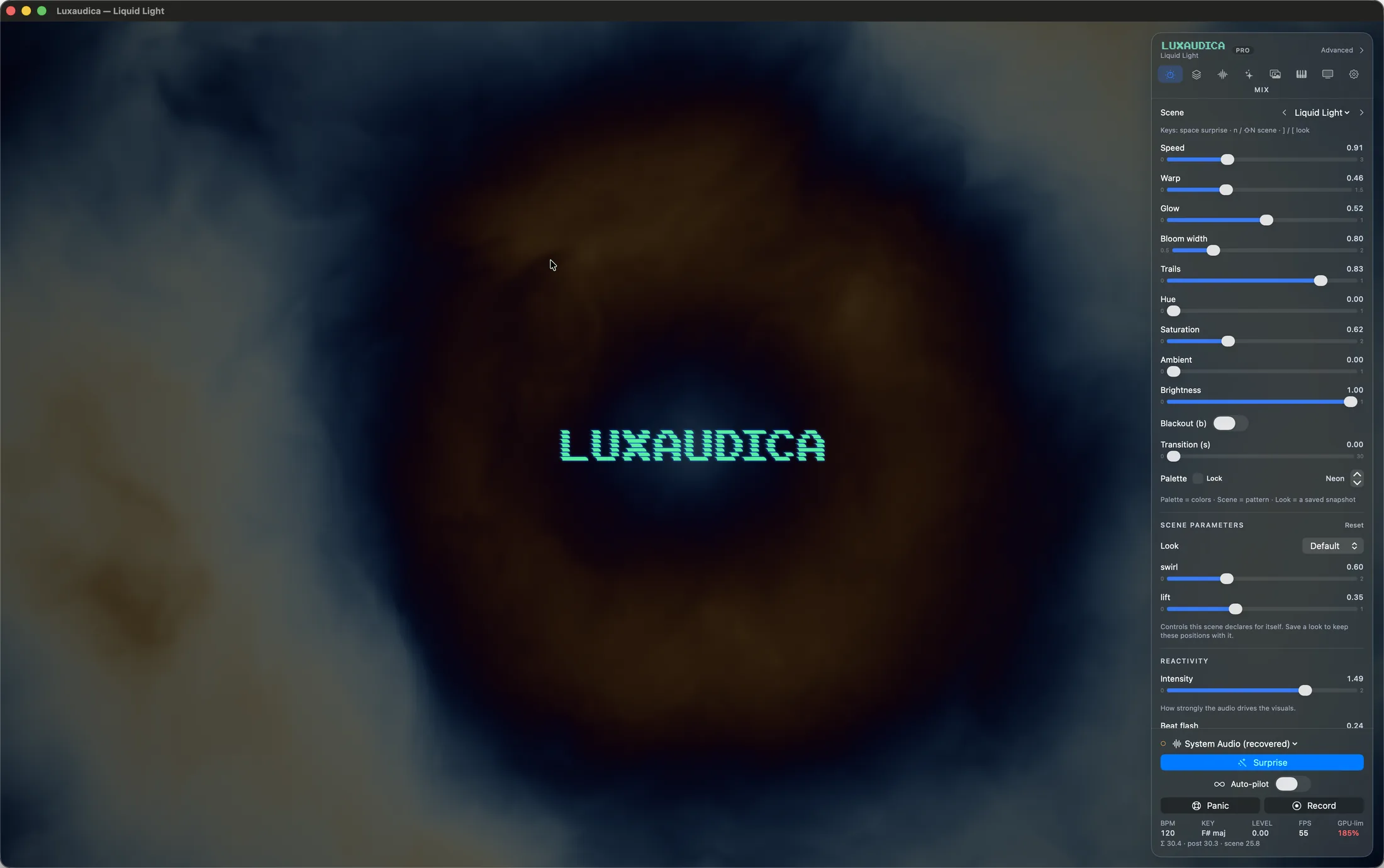
// Make it yours · themes
The whole control surface re-skins into complete looks — palette, type, controls and texture, not just a tint. Tap a theme; the panel below changes live. (CRT is the same warm phosphor this very site is dressed in — its roll bar even keeps the site's 8-second sweep.)
// The library
Every one generative and audio-reactive — from smoke and ink to marble, starfields and fluid simulations. A selection, rendered live:
Twenty seconds across the library, uncut and in mono. Every frame is the engine running, not a render.
Half a minute on Auto-pilot — no two moments alike. It crosses the whole library before a look repeats.


// The full roster · 103
// Output FX
This isn't just our website's style — it's a finishing filter you can drop on any scene: scanlines, grain, chromatic aberration, VHS warble, curvature. Flip between the presets, and it bakes straight into your recordings.
Filter scanlines 0.60 · chromatic 0.35 · curvature 0.50
A CSS approximation of the in-app Metal post-pass — the real presets are Off · CRT · VHS · Film.
// Captions
Turn on live captions and Luxaudica transcribes what it hears, right on the visuals — perfect for bands, talks and worship. The audio never leaves your Mac.
// Creative surface · the whole show
Connect your own LLM and Luxaudica becomes an instrument it can play. It reads the live music, drives every control, writes brand-new Metal shaders, and builds and runs entire cue shows — 29 tools, over a local connection you switch on.
> make the drop hit harder, then loop this look all night
// Real, authored live

“Drifting autumn leaves, gentle and slow.”
Drifting Leaves · a brand-new shader, compiled & hot-loaded live — not a recombined preset
// 29 tools, one connection
See
Read
Look
Author
Library
Show
Auto-pilot
Safety
Local & opt-in: the control endpoint binds to 127.0.0.1:9100 and stays off until you click Connect — which also hands you a one-file MCP connector for Claude Desktop. A scene that won't compile is skipped — your live show never breaks.
// Signal path
Four stages, one window — the signal flows straight through.
// Plays safe on any stage
A visualizer runs in front of real people. Luxaudica respects them — and so does this site, which honors the very same settings.
A photosensitivity cap tames the per-beat strobe so the room stays comfortable.
Honors the macOS setting — freezes animated textures, the CRT roll and VHS warble.
Every control carries a label and value; the active tab is announced.
// The full rig
Wire it into your setup — controllers, clocks, displays, code.
What it does for a room → Pick the room you are buying for → Every control, documented →